
User Guide


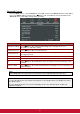
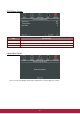


Table Of Contents
- S2 ViewSonic Pro9 UM-VS-EN-20160706.pdf
- Getting Started
- Setup and Operation
- On-Screen Display (OSD) Menu Settings
- Maintenance and Security
- Troubleshooting
- Specifications
- Regulatory Compliance
- Appendix I
- Appendix II

41
Advanced Feature
Press the Menu button to open the OSD menu. Press ◄► to move to the Advanced menu. Press ▲▼ to
move to the Advanced menu and then press (Enter) or ►. Press ▲▼ to move up and down in the
Advanced menu. Press ◄► to change values for setting.
ITEM
DESCRIPTION
OSD Menu Setting
Press (Enter) / ► to enter the OSD setting menu. See page 42 for more
information on OSD Menu Setting.
Air filter timer reset
Press (Enter) / ► to reset Air filter timer.
Lamp Hour Reset
After replacing the lamp, this item should be reset. See page 42 for more information
on Lamp Hour Reset.
Low Power Mode
Press ◄► to turn Low Power Mode Off, On or On by Lan.
Sleep Timer (min)
Press the cursor ◄► button to select the Sleep Timer.
3D
Press (Enter) / ► to enter the 3D menu. See page 43 for more information on 3D
settings.
Network setting
Press (Enter) / ► to enter the Network menu. See page 43 for more information on
Network Setting.
Note:
About “On By Lan”, RJ45 will support to be waked up in this mode(Under 6W) but scalar won’t.
Note:
To enjoy the 3D function, first enable the Play Movie in 3D setting found in your DVD device under
the 3D Disc Menu.
To enjoy Network function on Low Power Stand-By, Please let Low Power Mode set On, and
RS232 set Network.