
User Guide


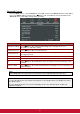
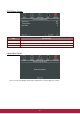


Table Of Contents
- S2 ViewSonic Pro9 UM-VS-EN-20160706.pdf
- Getting Started
- Setup and Operation
- On-Screen Display (OSD) Menu Settings
- Maintenance and Security
- Troubleshooting
- Specifications
- Regulatory Compliance
- Appendix I
- Appendix II

40
Advanced Menu
Press the MENU button to open the OSD menu. Press the cursor ◄► button to move to the Advanced
menu. Press the cursor ▲▼ button to move up and down in the Advanced menu.
ITEM
DESCRIPTION
Quick Auto Search
Press the cursor ◄► button to enable or disable automatic source detection.
Auto Power Off
(min.)
Press the cursor ◄► button to enable or disable automatic shutdown of lamp when
no signal.
Direct Power On
Press the cursor ◄► button to enable or disable automatic power On when AC power is
supplied.
High Altitude
Press the cursor ◄► button to toggle between Normal and High fan speeds.
Note: Recommend selecting high speed when the altitude of the environment is
higher than 1500m ( 4921ft )
Lamp Mode
Press the cursor ◄► button to select the lamp mode for higher brightness or lower
brightness to save lamp life.
Advanced
Press (Enter) / ► to enter the Advanced menu. See Advanced Feature on page
41.
Reset All
Press (Enter) / ►
to reset all items to factory preset values.
Status
Press (Enter) / ►
to enter the Status menu. See page 54 for more information on
Status.
Note :
Dynamic ECO: Auto power consumption saving according to your dynamic content (30% Max saving on
blank screen).
Extreme Dimming: Saving 50% lamp power consumption by blank screen (press BLANK button)