
User Guide


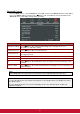
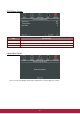


Table Of Contents
- S2 ViewSonic Pro9 UM-VS-EN-20160706.pdf
- Getting Started
- Setup and Operation
- On-Screen Display (OSD) Menu Settings
- Maintenance and Security
- Troubleshooting
- Specifications
- Regulatory Compliance
- Appendix I
- Appendix II

38
Presentation Timer
The Presentation Timer function can indicate the presentation time on the screen to help you achieve
better time management when giving presentations.
ITEM
DESCRIPTION
Timer
Press the cursor ◄► button to enable or disable presentation timer.
Preset Time
Press the cursor ◄► button to select Preset Time (1 ~ 60 minutes)
Timer Reset
Press (Enter) / ► to reset the timer settings.