
User Guide


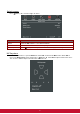

Table Of Contents
- S2 ViewSonic Pro9 UM-VS-EN-20160706.pdf
- Getting Started
- Setup and Operation
- On-Screen Display (OSD) Menu Settings
- Maintenance and Security
- Troubleshooting
- Specifications
- Regulatory Compliance
- Appendix I
- Appendix II

33
Video/Audio Menu
Press the MENU button to open the OSD menu. Press the cursor ◄► button to move to the Video/Audio
menu. Press the cursor ▲▼ button to move up and down in the Video/Audio menu. Press ◄► to change
values for settings.
ITEM
DESCRIPTION
AGC
Press the ◄► buttons to enable or disable the Automatic Gain Control for video
source.
Saturation
Press the ◄► buttons to adjust the video saturation.
Tint
Press the ◄► buttons to adjust the video tint/hue.
Overscan
Press the ◄► buttons to enable or disable video over scan.
Closed Caption
Press the ◄► buttons to enable or disable closed caption.
Audio
Press (Enter) / ► to enter the Audio menu. See Audio on page 34.
Reset
Press (Enter) / ► to reset all settings to default values.