
User Guide



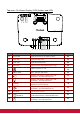


Table Of Contents
- S2 ViewSonic Pro9 UM-VS-EN-20160706.pdf
- Getting Started
- Setup and Operation
- On-Screen Display (OSD) Menu Settings
- Maintenance and Security
- Troubleshooting
- Specifications
- Regulatory Compliance
- Appendix I
- Appendix II

3
Top view—On-Screen Display (OSD) buttons and LEDs
ITEM
LABEL
DESCRIPTION
SEE PAGE
1.
Power LED
Display the power on/off sequence status.
64
2.
Lamp LED
Display the lamp status.
64
3.
Temp LED
Display the thermal status.
64
4.
Filter LED
Display the filter replacing warning message.
64
5.
Turn the projector on or off.
12
6.
MENU / EXIT
Opens and exits OSD menus.
23
7.
Navigates and changes settings in the OSD.
Quick Menu – For Horizontal Keystone.
23
8.
Navigates and changes settings in the OSD.
Quick Menu – For Vertical Keystone.
23
9.
Enter or confirm highlighted OSD menu item.
Displays the Corner Adj. page.
23
10.
Navigates and changes settings in the OSD.
Quick Menu – For Horizontal Keystone.
23
11.
SOURCE
Enter the Source menu.
23
12.
(My Button)
Allows user to define a short cut key on this button,
and the function item is selected in OSD menu.
23
13.
Navigates and changes settings in the OSD.
Quick Menu – For Vertical Keystone.
23
ZOOM
FOCUS
LENS SHIFT
SOURCE
MENU
EXIT
ENTER
1 2 3 4
5 6 7 8 9 10 11 12 13
ENTER