
User Guide

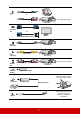


Table Of Contents
- Table of contents
- Important safety instructions
- Introduction
- Positioning your projector
- Connection
- Operation
- Starting up the projector
- Using the menus
- Utilizing the password function
- Switching input signal
- Adjusting the projected image
- Magnifying and searching for details
- Selecting the aspect ratio
- Optimizing the image
- Setting the presentation timer
- Hiding the image
- Locking control keys
- Operating in a high altitude environment
- Using the CEC function
- Using the 3D functions
- Controlling the projector through a LAN environment
- Using the projector in standby mode
- Adjusting the sound
- Shutting down the projector
- Menu operation
- Maintenance
- Troubleshooting
- Specifications

17
(for Component signal)
(for S-Video/Video signal)
(This connector may be
inside the projector. Open
the cover before using.)
(shared with top IR remote
sensor and a carrier
frequency of 38KHz is
supported)
Audio
in
Audio cable
Computer
Audio cable
A/V device
or
Computer
Out
VGA cable
Monitor
or
VGA to DVI-A cable
S-Video
connector
S-Video cable
A/V device
Video
connector
Video cable
A/V device
Audio in
L/R
Audio cable
A/V device
USB 5V/
2A Out
USB Power Charger
HDMI
connector
HDMI dongle
MicroUSB cable
IR Out
Remote control wire