
User Guide
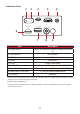



Table Of Contents

11
Connecon Ports
Port Descripon
Toggles the projector between standby mode and
on
[3] USB-C USB-C port
Power input socket
[7] USB A (5V/2A Out) USB 3.0 Type A port (USB Reader - FAT32/NTFS)
[8] Audio Out (3.5 mm jack) 3.5 mm jack audio output socket
[9] IR Sensor IR Sensor
¹ Please use the supplied USB-C cable, and ensure your USB-C device can support video transmission as well as
charging. For more about charging, see page 18.
²
iPhone/iPad users will need to buy an additional adapter. To avoid compatibility issues, please use Apple
1 2 3 4 5
6
7 8 9