
User Guide





20
vRemote 应用程序
vRemote应用程序允许用户通过其个人移动设备控制投影机。用户可以更改输
入源、静音/取消静音或打开/关闭投影机。
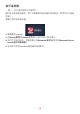
要使用ViewSonic投影机vRemote应用程序:
注: 确保已在投影机上打开vRemote应用程序:Home (主页) > Apps
Center (应用程序中心) > vRemote。
1. 从Google Play或Apple App Store下载应用程序并将其安装在您的移动设备
上。
2. 打开、注册(若适用)并登录应用程序。
3. 按“Add Device (添加设备)”图标。
4. 按“Next (下一步)”图标。
5. 使用相机扫描投影机投影的二维码。
6. 现在便可控制投影机。