
Instruction manual






adjusted by the Remote. Once normal DVD playback begins, you can adjust the
VOLUME using the buttons on either the DVD Player or the Remote
• To Increase the Volume:
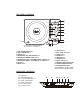
o Using the DVD Player: Press the NAVIGATION RIGHT /
VOLUME UP / F.FWD button (7)
o Using the Remote: Press the VOLUME UP button (14)
• To Decrease the Volume:
o Using the DVD Player: Press the NAVIGATION LEFT / VOLUME
DOWN / F.REV button (6)
o Using the Remote: Press the VOLUME DOWN button (15)
SKIPPING TO THE NEXT OR PREVIOUS SCENE/TRACK
• To Skip Forward to the next Scene/Track on a disc:
o On the DVD Player: Press the NAVIGATION DOWN / NEXT
button (5)
o On the Remote: Press the NEXT button (10)
• To Skip Backward to the previous Scene/Track on a disc:
o On the DVD Player: Press the NAVIGATION UP / PREVIOUS
button (4)
o On the Remote: Press the PREVIOUS button (11)
FAST FORWARD OR FAST REVERSE
• To use Fast Forward:
o On the DVD Player: Press & Hold the NAVIGATION RIGHT /
VOLUME UP / F.FWD button (7) until the screen display reads
“2X”
! Each time the NAVIGATION RIGHT / VOLUME UP /
F.FWD button (7) is Pressed & Held playback will scan
forward at x2, x4, x8, x16, and x32 normal speed.
o On the Remote: Press the F.FWD button (12)
! Each time the F.FWD button (12) is pressed playback will
scan forward at x2, x4, x8, x16, and x32 normal speed.
o Press the PLAY / PAUSE button on the DVD Player (2) or
Remote (2) to resume normal playback.