
Instructions / Assembly





A2
Inverter (0.75-30kW)
Chapter 8 Operation Examples
8
.1 Operation by panel
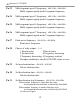
Pn 04 = 1(Command from panel),Pn 03 = 1(Frequency from potentiometer)。
Push button “RUN” on the panel, inverter starts up and running indicator is on.
Push the button again, inverter would stop.
8
8
8
.2 Operation by external signal
Pn 04=2 (command from port “FWD/REV”)
Pn 03=3 (frequency from port “5V”)
.3 Multi-segment speed
Pn 04=2(command from port “FWD/REV”)
Pn 03=7(frequency from multi-segment 0-7)
.4 Point move by panel
Command
(
Pn 04
)
must come from panel
(
=1
)
. Frequency
(
Pn 03
)
must be
specified by button(=2).After inverter stops, push button “←” to clockwise
point move and “
→
” to anticlockwise point move.
8
.5 Point move by external signal
Command
(
Pn 04
)
must come from port “FWD/REV”
(
=2
)
. Frequency
(
Pn 03)must come from external digital port(=6). After inverter stops,
connect “D0” and “JOG” to “GND” to point move clockwise, connect “D1” and
JOG” to “GND” to point move anticlockwise.
“
1
7