
OWNER'S MANUAL CD PLAYER CDX-35, CDX-35C, CDX-35P




16
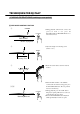
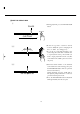
[1] Setting the cue point memory
①Set the cue point. (See the " cueing
operation")
②Press the "MEMO" button. The " 1 2 3 "
indicator lights on and off.
③Select any memory bank, and press bank
button.(EX : BANK 1)
④The bank indicator lights. (EX: BANK 1)
The cue point has been stored in memory
bank.
123
CUE POINT MEMORY
①②
③④
One player of CDX - 35 can memorize 3 cue points.
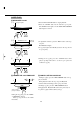
[2] Recall the cue point memory
①Press the bank button (The cue point is already set.)
②Press the "CUE" button , the player's pickup will return to set the cue point and enter the pause mode.
③Press the PLAY/PAUSE button. Playback will begin instantly from the cue point.
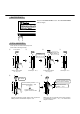
[3] Clear the cue point memory
①When you press " STOP " button twice, the cue point memory is cleared.
②Turn off power of CDX-35, the cue point memory is cleared too.