
DSL Modem User's Manual



58
DSL Modem User Manual
Reboot
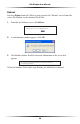
Selecting Reboot from the Utilities screen generates the “Reboot” screen. From this
screen, the Modem can be rebooted. To do this:
1. From the first Reboot screen, click Reboot.
2. A confirmation window appears. Click OK.
3. The Modem reboots. Read the onscreen information in the screen that
appears.
When the Modem’s Power light stops flashing, the Modem has rebooted.