
Installation Guide
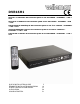






DVR16H1
14/04/2011 ©Velleman nv
4
4. Features
• H.264 real-time compression format
• high resolution recording
o CIF: 352 x 240 pixels @ 480 IPS (NTSC)/ 352 x 288 pixels @ 400 IPS (PAL)
o Frame: 704 x 480 pixels with 120 IPS (NTSC)/ 704 x 576 pixels with 100 IPS (PAL)
• Multiplex: allows live display, recording, playback, backup and network operation
• backup function: supports USB 2.0 flash drive and network backup
• powerful mobile surveillance on all major platforms including iPhone, BlackBerry, WinCE and J2ME
– via Eagle eyes Software
• intelligent motion trigger recording
o advanced motion detection
o scheduled motion detection recording (with 3 adjustable parameters)
• system auto recovery after power reconnected
• supports daylight-saving function
• supports manual / timer / motion /alarm recording functions
• multi-language OSD: English, French, Dutch, German, Portuguese, Spanish, Czech, Hungarian,
Greek, Chinese and Vietnamese
• user manual: English
• quick start manual: English, Dutch, French, Spanish, German
• supports SATA HDD
• PTZ control: supports PELCO-D protocol
• alarm I/O: 16 inputs, 1 output
• hard disks in option (not incl.): 500GB (HD500GB/S) or 750GB (HD750GB/S)
• IR remote control: DVRRC3 (incl.)
• optional monitor (not incl.): MONSCA3, MONSCA4, MONSCA5, MONSCA6
5. Overview
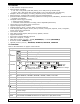
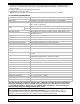
Refer to the illustrations on page 2 of this manual.
Front panel
LED
indications
HDD reading or recording activities on the hard disk
ALARM an alarm was triggered
TIMER timed recording is enabled
PLAY the DVR is in playing mode
POWER DVR power is on
NAVIGATE
Press one of the four positions on the navigate button to move the
cursor up (
), down ( ), left ( ) or right ( ).
In play-back mode, press the buttons to play/pause (
), stop
(
), fast rewind ( ) or fast forward ( ) the play-back file.
In setting mode, press the up (
) or down ( ) button to change
the setting in the menu.
MENU Press to enter the main menu.
ENTER Press to confirm settings
LIST
List the information of the recorded files.
QUICK SEARCH / RECORD / MOTION / ALARM / TIMER / FULL LIST
PLAY Press to play the recorded video.
SLOW In playback mode, press to play the recorded file slowly.
ZOOM In live or playback mode, press to enlarge the image of the selected channel.
SEQ Press to show all screens sequentially in full screen mode. Press again to quit.
Press to show the multiple channel display mode.
1 ~ 16 Press a button to select the corresponding channel.
SEARCH Enter time search mode. Set time range and press START to see all recordings within
the time range.
POWER Press and holt to switch off the DVR.
AUDIO
= SLOW + ZOOM
Press SLOW and ZOOM simultaneous to select live or play-back sounds.