
User`s manual


High Definition AD Player User’s Manual
8
3.2 Replace remote control battery
1. Open the battery cover
2. Take out the battery box in the right direction as the following picture shows
3. Remove the used battery
4. Insert the new battery in the right way
5. Put back the cover
3.3 Menu operation
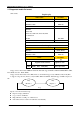
Main Menu includes following sub-menu: Input Source, System, Display, Clock Setup, ON/OFF Time Setup,
Volume Setup.
Press “SETUP” to enter Main Menu, press ↑↓to select the right item, press “play” to confirm selection.
Choose EXIT to exit the Main Menu.
Main Menu
Input Source
System
Display
Clock Setup
ON/OFF Time Setup
Volume Setup
EXIT
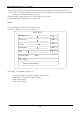
Input Source: The default input is card reading system, press ↑↓to select the right input, press “play” to
confirm selection.
Input Source
Storage
Component
HDMI
AV
VGA
Return Main Menu