
User`s manual



High Definition AD Player User’s Manual
12
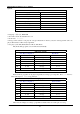
Normally on: the player keeps turning on once power is connected.
Always off: the player will turn off after two minutes if there is no operation.
On/Off time setup: 3 groups of On/off setup provided in the menu.
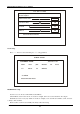
On/Off Time Setup
On/Off Mode Uniform Mode
Everyday
On/Off Mode Normally on
Active On Time Off Time
Range1 Off 0:00 0:00
Range 2 Off 0:00 0:00
Range 3 Off 0:00 0:00
Return Main Menu
Uniform mode:
Factory default is On. Press ←→ button to set up On/Off mode and press play to confirm selection.
Week mode:
Press ←→ button to set up On/Off mode and press play to confirm selection.
Note: factory default is Normally on.
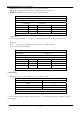
On/Off Time Setup
On/Off Mode Week mode
Friday
On/Off Mode On/off setup
Active On Time Off Time
Range1 Off 0:00 0:00
Range 2 Off 0:00 0:00
Range 3 Off 0:00 0:00
Return Main Menu
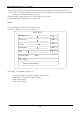
Volume Setup:
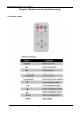
Press VOL+, VOL- to adjust volume or press ←→ button to select.
VOLUME SETUP
DEFAULT VOLUME 30
Range1 Off
Range 2 Off
Range 3 Off
Confirm
Return Main Menu
Press “PLAY” to set up volume of each range, press↑↓to select the right item. Choose Return to exit. See
below drawing.