
User manual
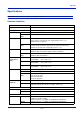
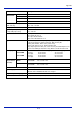
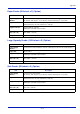
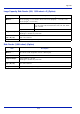
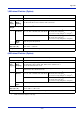
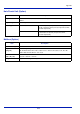
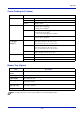
Table Of Contents
- Included Guides
- Safety Conventions in This Guide
- Symbols
- Contents
- Legal and Safety Information
- Notice on Software
- Notice
- Regarding Trade Names
- License Agreements
- Compliance and Conformity
- Energy Saving Control Function
- Automatic 2-Sided Print Function
- Resource Saving - Paper
- Environmental benefits of "Power Management"
- Environment
- Cautions when Handling Consumables
- Other precautions
- Laser Safety (Europe)
- About the Operation Guide
- Conventions
- 1 Part Names
- 2 Preparation before Use
- 3 Printing
- 4 Document Box
- 5 Status Menu
- 6 Operation Panel
- Report Print
- USB Memory (USB memory selection)
- Counter (Viewing the counter value)
- Paper Settings
- Print Settings
- Paper Source (Selecting the paper feed source)
- MP Tray Priority (the settings for priority paper feed from the MP tray)
- Paper Feed Mode (Setting the paper feed source)
- Duplex (Setting the duplex printing)
- Paper Output (Selecting the Paper Output Location)
- Override A4/LTR (Overriding difference between A4 and Letter)
- Emulation (Setting the emulation)
- Color Mode (Selecting color or black & white printing)
- Print Quality (Setting print quality)
- Page Setting (Setting pagination)
- Offset 1PageDoc. (Offset One Page Documents)
- User Name (The User Name display settings)
- Job Name (The Job Name display settings)
- Network (Network settings)
- Optional network (Optional Network settings)
- Device Common (Selecting/Setting the common device)
- Language (Selecting the message language)
- Def. Screen(Box) (Document Box default screen settings.)
- Date Setting (Date and time settings)
- Buzzer (Alarm (Buzzer) setting)
- Display Bright. (Display brightness setting)
- Disp. Backlight (Display backlight setting)
- Error Handling (Error detection setting)
- ColorToner Empty (Setting when color toner runs out)
- Timer Setting
- USB Keyboard Type (USB keyboard type selection)
- Manual Staple (Manual Staple setting)
- TonerAlert Level (Setting for the alert level for toner addition)
- Display Jobs Log
- Msg Banner Print (Preview screen setting for Banner Printing)
- Security (Security function setting)
- User/Job Account (User Login Setting/Job Account setting)
- Adjust/Maint. (Adjust/Maintenance selection/setting)
- Op Functions (Optional application settings)
- Shut down (Shutting down the machine)
- 7 Maintenance
- 8 Troubleshooting
- General Guidelines
- Print Quality Problems
- Error Messages
- Clearing Paper Jams
- Possible Paper Jam Locations
- General Considerations for Clearing Jams
- Utilizing Online Help Messages
- Cassette 1
- Cassette 2
- Optional Cassettes 3 and 4
- Multi Purpose Tray
- Inside the Right Covers 1, 3 and 4
- Duplex unit
- Duplex Unit and Cassette 1
- Bridge Unit (Option)
- 1,000-sheet Finisher (Option)
- 4,000-sheet Finisher (Option)
- Mailbox (Option)
- Center-Folding Unit (Option)
- Cassette 5 (Option)
- Cassette 6,7 (Option)
- Clearing a Staple Jam
- Appendix
- Optional Equipment
- Overview of Optional Equipment
- Paper Feeder (500-sheet x2)
- Large Capacity Feeder (1,500-sheet x 2)
- Side Feeder (3,000-sheet)
- Side Feeder (500-sheet x 3)
- Large Capacity Side Feeder (500, 1,500-sheet x 2)
- 1,000-sheet Finisher
- 4,000-sheet Finisher
- Manual staple mode
- Mailbox
- Folding Unit
- Banner Tray
- Network Interface Kit
- Wireless Network Interface Kit
- Data Security Kit
- ThinPrint Option
- Emulation Option
- Card Authentication Kit (B)
- USB Keyboard
- Character Entry Method
- Paper
- Specifications
- Common functions
- Paper Feeder (500-sheet x 2) (Option)
- Large Capacity Feeder (1,500-sheet x 2) (Option)
- Side Feeder (500-sheet x 3) (Option)
- Large Capacity Side Feeder (500, 1,500-sheet x 2) (Option)
- Side Feeder (3,000-sheet) (Option)
- 1,000-sheet Finisher (Option)
- 4,000-sheet Finisher (Option)
- Hole Punch Unit (Option)
- Mailbox (Option)
- Center-Folding Unit (Option)
- Glossary
- Optional Equipment
- Index
Appendix
A-18
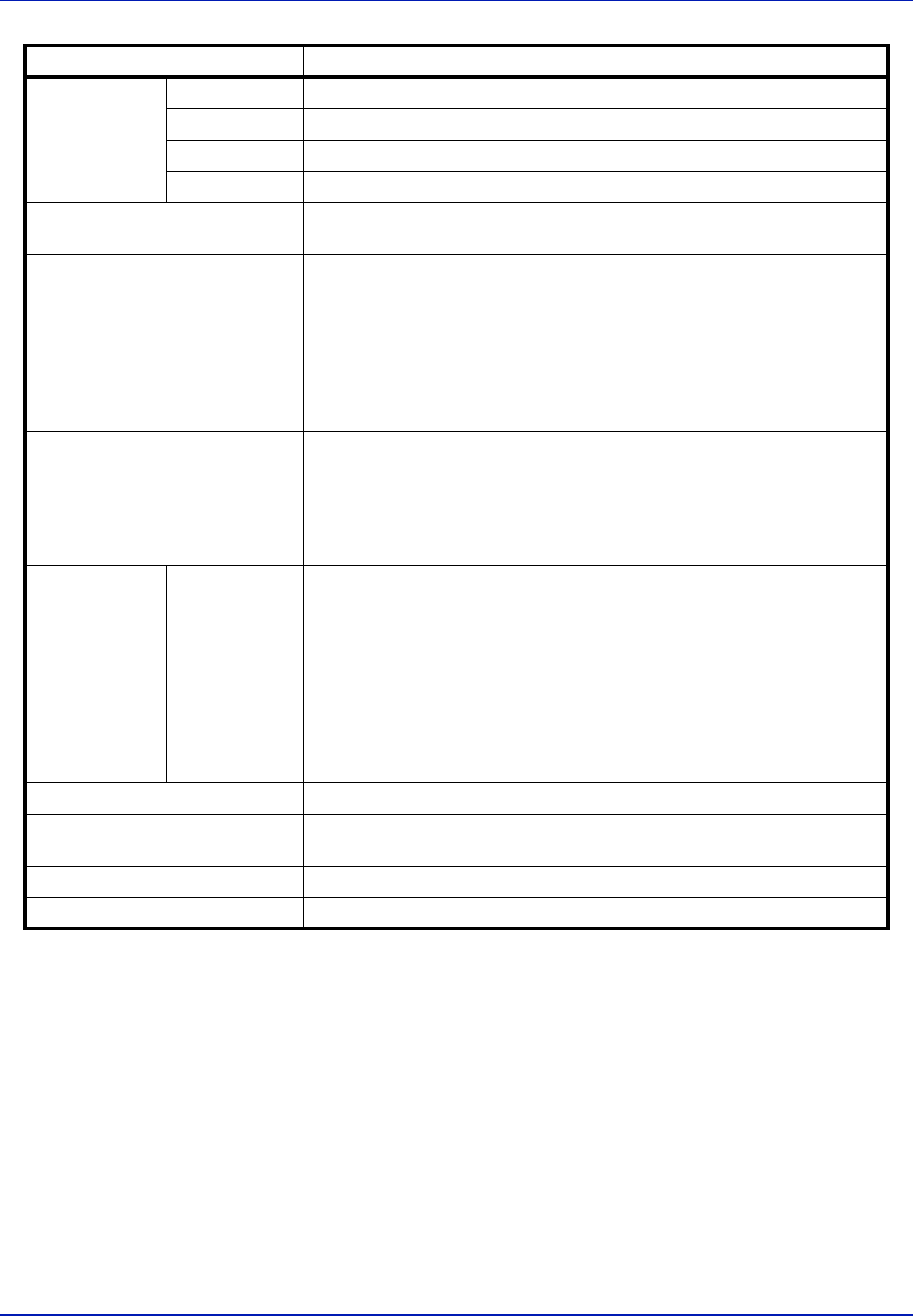
Operating
Environment
Temperature 10 to 32.5°C/50 to 90.5°F
Humidity 15 to 80 %
Altitude 2,500 m/8,202 ft maximum
Brightness 1,500 lux maximum
Dimension (W × D × H)
(Main unit only)
26 19/32 × 30 63/64 ×29 13/32"
668 × 787 × 747 mm
Weight (with toner container) 235.8 lb/107 kg
Space Required (W × D)
(Using multi purpose tray)
38 29/64 × 30 63/64"
977 × 787 mm
Power Source 120 V Specification Model:
120 V AC 60 Hz 12.0 A
230 V Specification Model:
220 to 240 V AC 50/60 Hz 7.2 A
Options Paper Feeder (500-sheet x2), Large Capacity Feeder (1,500-sheet x 2),
1,000-sheet Finisher, 4,000-sheet Finisher, Data Security Kit,
Folding Unit, Mailbox, Side Feeder (3,000-sheet),
Side Feeder (500-sheet x 3), Network Interface Kit,
Large Capacity Side Feeder (500, 1,500-sheet x2), Emulation Option, Hole
Punch Unit, USB Keyboard, Banner Tray, Wireless Network Interface Kit
Printing Speed
P-C4580DN
P-C5580DN
Black and White copying Full color copying
A4/Letter 45 sheets/min 45 sheets/min
A3/Ledger 22 sheets/min 22 sheets/min
A4/Letter 55 sheets/min 50 sheets/min
A3/Ledger 27 sheets/min 25 sheets/min
First Print Time
(A4, feed from
Cassette)
Black and
White
P-C4580DN: 5.4 seconds or less
P-C5580DN: 4.9 seconds or less
Full color P-C4580DN: 6.6 seconds or less
P-C5580DN: 6.2 seconds or less
Resolution 600 × 600 dpi
Operating System Windows XP, Windows Server 2003/R2, Windows Vista, Windows 7,
Windows Server 2008/R2, Mac OS 10.4 or higher
Page Description Language PRESCRIBE
Emulation PCL6(PCL5c, PCL-XL), KPDL3 (PostScript3 compatible)
Item Description