
User manual


Program Mode
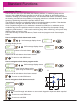
Display will show
tools
teach
Display will now show
0.000
0.000
set tool
tool 01
Take a skim cut if X axis is selected, or take a face cut if Z axis is selected
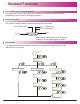
Repeat the above process for all the tools required.
Note:
to select
different tools
tools
program
Note: Tool must not be moved off the part after taking the cut.
User needs to enter the difference between measured diameter and readout value
to exit tool set mode
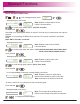
The message window displays which tool is in use
feed 00
tool 01
To scroll through different tools, or enter tool number on numerical keypad
at any time.
Lathe Functions
Until message display shows
feed 00
tool 01
30
Using Tool Offsets