
User manual


Lathe Functions
This chapter details the Lathe functions of the DP700.
Tool Offsets
The Tool Offset function allows the operator to enter and store offsets for a range of tools.This
enables the operator to change tools without resetting absolute zero or datum. Using tool
offsets ensures that diameter and length measurements will remain consistent after tool
changes.This speeds up tool changes and increases productivity as it eliminates the need for
the operator to stop and manually measure the diameter.
The number of Tool Offsets available is 50. This large number allows tools to be grouped
where more than one set is used. For convenience, it is highly recommended that tools are
physically marked with their corresponding tool number.
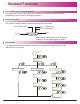
There are two ways to set tool offsets, teach mode and program mode.
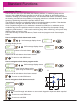
How to navigate to the tool offset function.
Until message display shows
,
funcs
set tool
Display will show
tools
teach
Display will now show
select
select
teach
tool 01
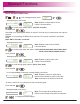
Select the
axis needed
Take a skim cut if X axis is selected, or take a face cut if Z axis is selected
Display will show
0.000
teach
capture
In this example the X
axis has been selected
Display will show
0.000
teach
value
Note: at this point you can move
the tool away from the part
Measure the part with an accurate gauge and enter this value using the numeric keypad.
Repeat the above process for all the tools required.
Note:
to select
different tools
to exit tool set mode
Teach Mode
29