
User manual


Line Hole
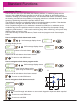
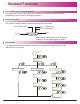
The DP700 calculates positions for a series of equally spaced holes on a line. The message
display prompts the user for various parameters it needs to do the calculations.
Once the DP700 completes the calculations, the axis displays show the distance to each hole.
The operator works to zero for each hole location. See example below.
How to navigate to line hole function.
Until message display shows
,
funcs
line
Example
Message display shows
line
start
180.500
200.000
Enter starting co-ordinates
(See using set mode P19)
line
length
Enter the line length
(See using set mode P19)
350.000
line
holes
Enter number of holes
(See using set mode P19)
9
line
angle
Enter line angle
(See using set mode P19)
20
Note: length is the total length of the line hole sequence, not the distance between adjacent
holes
Note: At this point you can use the keys to navigate back and forth through the above
menus.
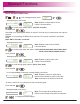
line
go
-180.500
-200.000
line go
hole 01
Note: The numbers appear as negative
values because the operator works to
zero.
Navigate through the sequence of holes by using keys
Mill Functions
180.5mm
200mm
Y axis
X axis
Datum
Starting point
350mm line
length
9 holes
20º
line
angle
26
The maximum number of holes is 999