
User manual


PCD / Bolt Hole Circle
Mill Functions
The DP700 calculates positions for a series of equally spaced holes around the circumference
of a circle. The message display prompts the user for various parameters it needs to do the
calculations.
Once the DP700 completes the calculations, the axis displays show the distance to each hole.
The operator works to Zero for each hole location. See example below.
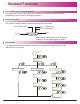
How to navigate to PCD function.
Until message display shows
,
funcs
pcd
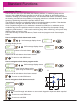
Example
Circle centre
150mm
diameter
X axis
Starting hole
Y axis
99.7mm
Datum
125.25mm
18º
starting
angle
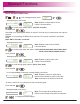
Message display shows
PCd
centre
125.250
99.700
Enter centre co-ordinates
(See using set mode P19)
PCd
diameter
Enter the diameter value
(See using set mode P19)
150.000
PCd
holes
Enter the number of holes
(See using set mode P19)
5
PCd
angle
Enter the start angle value
(See using set mode P19)
18
PCd
go
-196.580
-122.880
PCd go
hole 01
Note: The PCD will be calculated from the 3 0‘clock position, anti-clockwise. Enter the angle
as a negative value if it is given as clockwise from 3 o’clock.
Note: The numbers appear as negative
values because the operator works to
zero.
Note: At this point you can use the keys to navigate back and forth through the above
menus.
(-196.580, -122.880)
Navigate through the sequence of holes by using keys
This chapter details the Mill functions of the DP700. The mill functions use the plane setting
from setup.
25
The maximum number of holes is 999