
User manual


Standard Functions
RS232 Setup
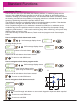
How to navigate to RS232 setup.
Until message display shows
,
funcs
LOG
Message display shows
LOg
baud
115200
Note: Relates to baud rate of RS232
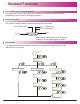
Communications
to scroll through baud rate options. (300,1200,2400,4800,9600,14400,19200,38400
57600,115200,230400,460800,921600.)
Once selected
Message display now shows
LOg
parity
none
Note: Relates to parity mode of the
RS232 Communications
to scroll through parity options. (None, Even, Odd)
Once selected
Message display now shows
LOg
output
off
Note: Relates to output options of the
RS232 Communications
to scroll through output options. (Off, ENT, Periodic)
Once selected
In the case periodic is selected, message display now shows
LOg
period
10.0
Note: Relates to period of output log for
RS232 Communications (value in seconds)
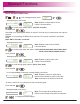
To enter a value in 0.1s increments use the numerical keypad.
Once selected
Message display now shows
LOg
GO
Note: This accepts all the settings for the
RS232 Communications and puts into operation
to accept the RS232 settings
Note: Ent, is for operating the RS232 on request. The enter key is pressed when the output is
required.
Periodic, is for operating the RS232 at set intervals. The interval is defined in the RS232
setup.
Note: Performance is relative to baud rate.
When ENT or Periodic is selected
23