
User manual


Standard Functions
RS232 (Data Logging) / Data Acquisition
The DP700 DRO can offer basic serial communications via a dedicated hardware RS232
compatible port, this is used for data logging purposes.
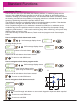
RS232 Connections
You connect the RS232 to the DP700 via a 15-pin D-type connector at the rear of the display.
The required connection details to make this possible are shown below.
Pin 5 - RS232 GND
Pin 2 - RS232 RXD
Pin 3 - RS232 TXD
Pin 1
Pin 15
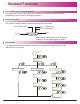
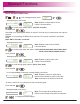
RS232 Setup
The diagram below shows the different menus that are applicable for different RS232 output
selections (off, ent, periodic).
Serial cable available (part number 307-83210),
Contact your local Newall supplier for details.
funcs
LOG
LOg
output
off
ent
periodic
LOg
baud
LOg
parity
LOg
period
LOg
GO
LOg
baud
LOg
parity
22