
User's Manual


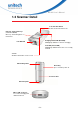


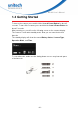
Table Of Contents
- About This Manual
- Regulatory Compliance Statements
- Laser Information
- LED Information
- Battery Notice
- Adapter Notice
- Hearing Damage Warning
- Worldwide Support
- North America
- Please scan QR Code to visit us :
- Warranty Policy
- 1.1 Package
- 1.2 Scanner Detail
- 1.3 Specifications
- 1.4 Getting Started
- 1.5 Battery Charging
- 1.6 LED Indicator / Beeper Sequence
- 1.7 Display Menu Tree
- 2.1 NFC Pairing with Mobile Devices
- 2.2 BT HID
- 2.3 BT SPP
- 2.4 BT SPP (Slave)
- 2.5 USB SPP
- 3.1 All symbologies
- 3.2 Message Length Description
- 3.3 1D
- 3.3.1 Codabar
- 3.3.2 Code 39
- 3.3.3 Interleaved 2 of 5
- 3.3.4 Code 93
- 3.3.5 Standard 2 of 5 Industrial (three-bar start/stop)
- 3.3.6 Standard 2 of 5 IATA (two-bar start/stop)
- 3.3.7 Matrix 2 of 5
- 3.3.8 Code 11
- 3.3.9 Code 128
- 3.3.10 UPC-A
- 3.3.11 UPC-E0
- 3.3.12 UPC-E1
- 3.3.13 EAN/JAN-13
- 3.3.14 EAN/JAN-8
- 3.3.15 MSI
- 3.3.16 GS1 DataBar Omnidirectional
- 3.3.17 GS1 DataBar Limited
- 3.3.18 GS1 DataBar Expanded
- 3.3.19 PDF 417
- 3.3.20 QR Code
- 3.3.21 Data Matrix
- 3.3.22 MaxiCode
- 3.3.23 Chinese Sensible (Han Xin) Code
- 3.4 2D
- 4.1 System setting
- 4.2 BT pairing
- 4.3 Output data transmit
- 4.4 BT Config
- 4.5 Beep & Vibration
- 4.6 Scan mode / Parameter Selection
- 4.7 Prefix/Suffix selections
- 4.8 Data formatting
- 4.9 Data Validation
- 4.10 Lookup Table Function
- 4.11 Manually set up

- 1 -
MS926 User’s Manual
Cha pte r 1 - Overvie w
1.1 Package
Please make sure the following contents are in the MS926 gift box.
If something is missing or damaged, please contact your unitech
representative.
The standard package contents
MS926 Scanner
Quick Reference
Guide
Micro USB to
USB Cable
Hand Strap
Optional accessories
1-Slot Charging cradle 5-Slot Charging cradle USB Adapter
NOTE: 1. The scanner’s default power off time is 5 minutes.
2. Please charge scanner for at least 2 hours prior to initial use.
3. The barcode with an asterisk (*) which appears in the following chapters
indicates that it is the default option for the corresponding setting.