
User guide



AirMagnet Spectrum XT User Guide
Chapter 4: Menus and Tools 45
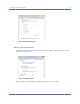
Figure 4-15: Remote Access Authentication screen
Using Easy View Options
The Easy View tool allows the user to filter data to be displayed on the screen so that they
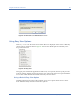
can focus more on data of interest. Figure 4-16 shows the default options in the Easy View
drop-down list menu.
Figure 4-16: Easy View
The upper part contains the application’s built-in easy view options; the lower part provides
tools for creating, deleting, and saving custom view options. All custom view options that the
user creates will be added to the bottom of the Easy View list menu.
Using a Default Easy View Option
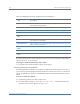
AirMagnet Spectrum XT comes with a number of easy view options for the user to choose
from. Table 4-4 briefly describes each of these options.