
User guide



44 Chapter 4: Menus and Tools
AirMagnet Spectrum XT User Guide
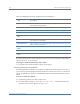
The trap will have the following details:
Device Type
Device Identifier
Device Description
First Seen Time
Last Seen Time
Channel
Max Power at the Channel
Average Power at the Channel
Center Frequency of the Channel
Remote Spectrum Analysis
The Remote Spectrum Analysis feature can be used to give access to and control of the
AirMagnet Spectrum XT application to a user that is offsite. This can be particularly useful for
the IT professional needing to troubleshoot an issue at a remote location.
The Remote Spectrum Analysis interface is controlled through two menu options.
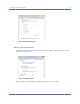
Connect to Remote Host - Opens a dialog where connection information about Remote Host
IP Address, Port Number and (Security Password) Authentication key can be entered.
Figure 4-14: Remote Host Connection screen
Disconnect from Remote Host - This will disconnect the application from the remote
Spectrum Analyzer mode. Live Capture will be stopped.
Before connecting to a remote machine, the user should have received an authentication key
from the remote user. The Remote user should set the authentication key with the Remote
Access Authentication menu which opens a dialog where the user can set the authentication
key.