
User guide



42 Chapter 4: Menus and Tools
AirMagnet Spectrum XT User Guide
With AirMagnet Spectrum XT 2.0.2, users have the ability to remotely log into the user
interface and monitor ambient traffic patterns using a separate machine. In order to connect to
the XT remote interface, users must install the AirMagnet Spectrum XT Viewer-Only license
(provided with the purchase of a valid AirMagnet Spectrum XT license) on the second
machine. From the secondary computer, users may simply launch the AirMagnet Spectrum
XT application and use it to connect directly to the main licensed machine (using the
machine’s IP address). The spectrum data detected by the remote system will automatically
populate the secondary computer’s interface.
Integration of AirMagnet Spectrum XT with SNMP Management Stations
AirMagnet Spectrum XT provides a MIB file (AirMagnetSpectrumInterferer.mib) that allows
AirMagnet Spectrum XT to send SNMP traps to multiple SNMP management stations when
an inteferer is detected by AirMagnet Spectrum XT. When you receive a trap from AirMagnet
Spectrum XT, it is possible to view detailed description of the trap and thereby functioning of
your wireless network. To receive traps from the AirMagnet Spectrum XT on your SNMP
management station, follow these steps:
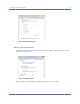
• From AirMagnet Spectrum XT, launch the SNMP settings dialog box by clicking
Settings=>SNMP Settings menu. In the General tab, specify the IP addresses of all of your SNMP
stations. The check box Send SNMP Traps should be enabled to send the SNMP traps. See
Figure 4-12.
Figure 4-12: User can set various filters to control SNMP traps sent by AirMagnet Spectrum
XT.