
User guide



40 Chapter 4: Menus and Tools
AirMagnet Spectrum XT User Guide
Virtual AP Grouping
AirMagnet Spectrum XT’s Virtual AP Grouping feature allows users to set up specific names
for single devices hat utilize multiple SSIDs under different BSSIDs. These groups help users
identify instances where separate BSSIDs show up and appear to be several different devices,
when they actually belong to a single device. See Figure 4-9.
Spectrum comes with several built-in “automatic” AP Group rules. If you enable them, they
will automatically group all devices meeting the criteria specified in the rule under a single
AP Group.
To configure AP grouping settings:
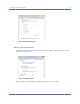
1) From the Configure window, click the AP Grouping tab. See Figure 4-9.
Figure 4-9: AP grouping tab
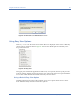
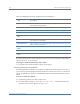
This tab provides two different types of rules for grouping APs. See the sections below for
instructions on configuring each type.