
User guide



AirMagnet Spectrum XT User Guide
Chapter 4: Menus and Tools 39
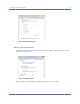
Figure 4-8: Record Options
Files saved in .csv format cannot be played back using AirMagnet Spectrum XT.
To record .csv files:
1) From the Record Options tab, click the csv radio button.
2) Select either Spectrum data or Wifi data to be used.
3) Specify the folder in which the files should be saved, either by entering the path manually
or by clicking the Browse… button.
4) Enter a prefix for the files, if desired.
5) Specify the frequency with which the files should be saved off.
6) Click OK to save the changes.
• Automatically Record Live Capture Data at Application Launch: This option allows the user
to set a default to record live capture at launch of AirMagnet Spectrum XT.
• Max Live Capture Streaming File Size (MB): This option allows the user to adjust the
maximum amount of data that will be captured in a single live capture instance (up to 2 GB).