
User guide



38 Chapter 4: Menus and Tools
AirMagnet Spectrum XT User Guide
Specifying Record Settings
By default, AirMagnet Spectrum XT saves collected data in AirMagnet's .amt format.
However, the Record Options tab allows the user to save information in .csv format for
analysis in other applications.The default format is .amt although .csv can also be selected to
view the data in a spreadsheet format. The captured data can be viewed from both a Spectrum
Analyzer adapter and a WiFi adapter.
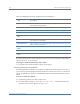
Table 4-3: Display Options
Option Description
Alert Settings When enabled, this option will highlight the Duty Cycle column in the
Channel Summary field when it exceeds the specified threshold. Channels
on which the Duty Cycle meets this criteria will be highlighted in red
(channels with normal levels are highlighted in green).
Channel Shadow
Settings
In WiFi deployment channels 1,6 and 11 in the 2.4 GHz spectrum are used.
These settings highlight these channels to provide a better perspective of
important channels.
Non Overlapping
Channels
Shows non overlapping channels (1,6 and 11).
All Channels Shows channels widths and locations of all the 802.11 channels in the
band.
View X-Axis Label By This allows the user to toggle between viewing charts by frequency range,
channel number and by ZigBee Channel. Although the default setting is
Frequency, many users may find the Channel selection easier to use and
analyze.
Frequency By default, users will view the data by frequency range (GHz).
Channel Users may view the spectrum data at the central frequency of each
channel.
Zigbee Channel This specification is similar to Bluetooth with a shorter bandwidth. It is
targeted at radio frequency applications that require a low data rate, long
battery life, and secure networking.