
User guide






AirMagnet Spectrum XT User Guide
Chapter 10: Device Detection 141
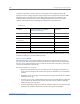
•Lucent
• Netwave Technologies
• Symbol Technologies
• Proxim Wireless
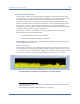
The figure below shows the RF spectrum pattern of a 2.4GHz 802.11FHSS device.
Figure 10-17: Frequency-hopping Spread Spectrum device
Impact on 802.11 WLAN
802.11FHSS devices can have a significant to severe impact on your WLAN. Because these
devices hop across the entire band in a semi-random pattern, no 802.11 channel is considered
safe from these devices. The actual impact of the 802.11FHSS on your WLAN will depend on
the range between the devices, the relative signal levels, and amount of data being transmitted
by each network.
Recommended Courses of Action
Once interfering cordless phones are successfully located, you can take the following actions
to minimize or eliminate their RF interference to your 802.11b/g or 802.11a WLAN:
• Do not waste your time switching AP channels, because RF signals from digital cord-
less phones spread over all channels or frequencies in the band they operate. Simply
adjusting AP channel is not the solution.
• If you have an 802.11b/g WLAN, avoid or stop using 2.4-Ghz FHSS cordless phones.
Instead replace them with 5.8-GHz or even old 900-MHz cordless phones which use
different radio bands and channels.
• If you have an 802.11a WLAN, avoid or stop using 5-GHz cordless phones. Instead
replace them with 2.4-GHz cordless phones.
• If you have an 802.11b/g WLAN and 2.4-GHz cordless phones are a must, try to use
those more expensive but less interfering ones which use Digital Spread Spectrum
(DSS) technology that offer wider range, better security, with less interference.