
User guide




AirMagnet Spectrum XT User Guide
Chapter 10: Device Detection 133
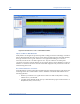
Figure 10-12: Interference Source - Zigbee
Impact on 802.11b/g WLAN
Given the fact that a 2.4-GHz Zigbee network operates on a fixed 3 MHz of bandwidth in the
2.4-GHz band, the chance of collision between a Zigbee device and an 802.11b or g device
depends on the channels on which they operate. If the channels overlap, the chance are high.
Otherwise, the chances are very low.
Recommended Courses of Action
Once a ZigBee network or devices are identified, the following actions are recommended
to minimize or eliminate the potential RF interference that they may cause to the WiFi
network:
• Try to set your ZigBee network to a non-overlapping channel not used by an 802.11b or g
network.
• Try to keep ZigBee devices physically away from WiFi devices to minimize the chances of
interaction.