
User guide




128 Chapter 10: Device Detection
AirMagnet Spectrum XT User Guide
Baby Monitors
Wireless baby monitors (digital or analog) use radio frequencies to transmit their signals.
These same radio frequencies are also used by wireless networks installed in the home
environment. As a result, RF interference will occur when the two competing systems are
operating in the same radio frequencies.
RF Spectrum Pattern
Most wireless baby monitors on the market today use the 2.4-GHz frequency, a bandwidth
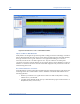
also used by the 802.11b/g wireless network and many other wireless devices. The figure
below shows the RF spectrum pattern of an analog baby monitor in the 2.4-GHz frequency
band.
Figure 10-8 shows the RF spectrum pattern of a baby monitor
Figure 10-8: RF spectrum pattern of a baby monitor
AirMagnet Spectrum XT will detect FHSS, DSSS and Single Carrier models of baby monitors.
Impact on WiFi Networks
Generally speaking, RF interference is not an issue when a baby monitor is not in use.
However, when it is in operation, it could have a negative impact on an 802.11 network,
especially when they are in close proximity. When the baby monitor is turned on, the device
will compete for bandwidth with the wireless network that is using the same radio frequency,
causing the wireless network to experience performance degradation as a result of RF
interference, and vice versa. The impact is more obvious for web applications involving
downloading files over the Internet or Voice over IP. The figure below shows the RF spectrum
pattern of a wireless analog baby monitor using the 2.4-GHz frequency band.
Recommended Courses of Action
Once an interfering wireless baby monitor is successfully identified, you can take all or some
of the following actions to minimize or eliminate the RF interference it causes to your 802.11
WLAN.
• Check the channels or frequencies used by your wireless network and wireless baby
monitor to make sure that they are not competing on the same channel or frequency.
• Since most of the wireless baby monitors today operate in the 2.4-GHz frequency
band, try to upgrade your wireless network to the 802.11n standard.