
User guide




AirMagnet Spectrum XT User Guide
Chapter 10: Device Detection 127
which varies from 200 to 700 feet (line of sight), depending on the physical conditions of the
site. Typically, multiple cameras are needed in order to provide full, overlapping coverage of
one site. To make matters worse, wireless security cameras installed in homes and businesses
are left on all the time. And so is the RF interference they cause to the 802.11 WLAN close to
them.
RF Spectrum Pattern
Wireless cameras come in all shapes and sizes. They include wireless surveillance cameras,
spy cameras, etc. They are widely used in homes and businesses where the 802.11 WLAN is
deployed. Their presence can cause serious performance issues in the WLAN. The figure
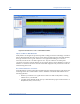
below shows the RF spectrum pattern of a wireless camera using the 2.4-GHz frequency band.
Figure 10-7 shows the RF spectrum pattern of a wireless security camera.
Figure 10-7: RF spectrum pattern of a wireless security camera
Impact on 802.11b/g WLAN
Because wireless cameras are widely used in homes and businesses where WLANs are
deployed, radio signals from these devices have long been identified as a source of RF
interference to 802.11b/g WLANs in these settings. They can significantly slow down Internet
applications such as Web file download and surfing.
Recommended Courses of Action
Once the interfering wireless security cameras are successfully identified, the following
actions are recommended to minimize or eliminate the RF interference they cause to the
802.11 WLAN.
• If you are using an 802.11b/g WLAN, avoid using 2.4-GHz wireless cameras. Instead,
use 5.8-GHz wireless cameras that operate in the licensed, less crowded 5-GHz radio
band. Or upgrade your WLAN to the 802.11n standard which offers better
interference avoidance.
• If you are using an 802.11a WLAN, avoid using 5.8-GHz wireless cameras.
• Check the operating channels on the wireless cameras, making sure that they do not
overlap with the operating channels of the WiFi network.