
User guide




120 Chapter 10: Device Detection
AirMagnet Spectrum XT User Guide
similar devices (i.e., two microwaves from different vendors). Consequently, the device’s pattern
may not always be an exact match for the example provided in the application.
Non-WiFi (Spectrum) Devices
The section discusses the various non-WiFi (spectrum) devices that AirMagnet Spectrum XT
is able to detect in a wireless network environment. It talks about their typical RF spectrum
patterns, impact on WiFi networks, and the best ways to minimize their interference to the
802.11 network.
Bluetooth Devices
Like most cordless phones on the market today, Bluetooth device also operate in the same 2.4-
GHz radio band used by 802.11b and 802.11g wireless LANs (WLANs). The problem is that
Bluetooth devices and 802.11b/g WLANs are based on two different modulation
technologies, which make their radio signals behave so differently that it is difficult for them
to operate in the same band without interfering with each other. Bluetooth devices, on the one
hand, are based on Frequency Hopping Spread Spectrum (FHSS) modulation. Their radio
signals hop from one frequency to another across the entire 2.4-GHz band, in searching for the
best channel or frequency to use. 802.11b/g WLANs, on the other hand, use Direct Sequence
Spread Spectrum (DSSS) modulation technology that allocates only three 22-MHz wide bands
within the 2.4-GHz spectrum and transmits over only one of those bands at any given time.
Because radio signals from Bluetooth devices hop across all channels randomly across the
entire 2.4-GHz radio band, they have a detrimental effect on 802.11b/g WLANs that operate
in the same 2.4-GHz band. As a result, no matter which channel your WLAN use or switch to
(Remember that there are only 3 non-overlapping channels in the 2.4-GHz radio band, i.e.,
channels 1, 6, and 11), it is hard for 802.11b/g APs to escape the RF interference caused by
Bluetooth devices operating on or in the vicinity of your network. Bluetooth devices can cause
performance degradation when used in close proximity to 802.11 stations, especially when the
latter are relatively far away from the APs or stations they are associating with, because of
weak signal strength.
RF Spectrum Pattern
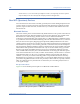
Figure 10-1 shows the RF spectrum pattern of a Bluetooth-enabled iPhone.
Figure 10-1: RF spectrum pattern of a Bluetooth-enabled iPhone