
User guide





116 Chapter 9: Radar Detection Tool
AirMagnet Spectrum XT User Guide
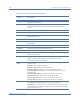
Scan When the box next to a channel listing is checked, this channel will be scanned
during a scanning session.
Period (min) This column provides a drop-down menu for each channel that can be used to
manually set the time the associated channel will be scanned during the
session.
Clear All Click this button to un-check all the channels.
Check All Click this button check all the channels
Reset Click this button to check all the channels and reset the “Period” column to the
default setting of 1 min.
Band This is a color legend that indicates the media type for the channel listing.
Scan Time Using this option will automatically set all the channels to the period set using
the drop-down.
Start Scan Click this button to begin a radar scanning session.
Stop Scan Click this button to end a radar scanning session.
Export Select a radar device listing and click Export to export the data in .csv format.
Cancel Click this button at any time to cancel a scanning session and close the Radar
Detection Tool window.
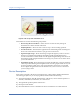
Radar Graph During an active scanning session, the radar graph charts real-time data by
plotting a function of the frequency range and the power in dBm
for the current channel being scanned
Radar Device
Table
The table below the graph will list any radar devices detected during the
scanning session.
Name: The device signature detected.
Band: The UNII band the device was detected in.
Peak Power dBm: The highest power level detected for the device.
Avg Power dBm: The average power level detected for the device for the
scanning period.
Center Frequency GHz: Refers to the center frequency of the device.
Affected Channel: The channel that is affected by the device.
First Seen Time: When the device was detected for the first time.
Last Seen Time: The most recent time when the device was detected.
Status bar Scanning Channel: During a scanning session, the current channel being
scanned will be displayed in the lower left side of the status bar.
Scan Time: During a scanning session, the time remaining for the scan of the
current channel will be displayed in the lower right side of the status bar. The
format is min min: sec sec.
Table 9-1: Radar Detection Tool UI Components
Option Description