
User guide





AirMagnet Spectrum XT User Guide
Chapter 9: Radar Detection Tool 115
Radar Detection Tool UI Components
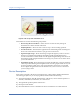
This section describes the options in the Radar Detection Tool user interface.
Figure 9-1: Radar Detection Tool User Interface
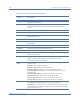
Table 9-1: Radar Detection Tool UI Components
Option Description
Settings bar This is the heading for the Settings panel.
You may collapse the Setting panel by clicking the push pin icon located to the
right of the Settings bar. Once collapsed, to view the panel, click the Settings tab
in the top left corner. To re-establish the default view, click the push pin.
Radar Class
Type
FCC: Federal Communications Commision channels for United States.
ETSI: European Telecommunications Standards Institute channels for Europe.
TELEC: Telecommunications Engineering Center channels for Japan.
Ch (Channel) This column lists the channels for the selected Radar Class Type