
User guide





108 Chapter 8: Finding Devices
AirMagnet Spectrum XT User Guide
• First Seen Time - The first time the device was detected.
• Last Seen Time - The most recent time the device was detected.
Device Pattern
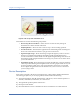
In the lower-left corner of the screen is the Device Pattern pane which shows the RF spectrum
pattern of the device being selected. The is chart is also available on the Spectrum-WiFi
Summary screen. See Figure 8-3.
Figure 8-3: RF spectrum pattern of a selected device
As seen in Figure 8-3, the Device Pattern pane shows the spectrum pattern the application has
detected of the selected device.
If the selected device is a WiFi device, the Device Pattern pane will show the Ideal Pattern
only. If the selected device is a non-WiFi device, then it will show both the Ideal Pattern and
the Detected Pattern. The application uses the Ideal Pattern as a reference when classifying
devices it has detected and determines the type of device by matching the Detected Pattern
with the Ideal Pattern. For example, if the application finds that a detected spectrum pattern
matches that of the ideal spectrum pattern of a Bluetooth device, it will categorize the device
as a Bluetooth device.
Note that the device pattern examples provided with AirMagnet Spectrum XT are intended to be
baselines, not exact matches for the devices detected. The device pattern can vary even between two
similar devices (i.e., two microwaves from different vendors). Consequently, the device’s pattern
may not always be an exact match for the example provided in the application.
Find Device Tool
The Find Device tool contains tools for locating any device (WiFi or non-WiFi) that has been
detected on the network. See Figure 8-4.