
User guide





AirMagnet Spectrum XT User Guide
Chapter 8: Finding Devices 107
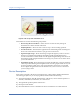
Figure 8-2: Detailed information about a selected device
The information displayed will vary, depending on the type of device detected (802.11 or non-
802.11). As shown in Figure 8-2, the Device Details pane shows the following information for
standard 802.11 devices:
• Device Name - The device category the selected device belongs to (i.e., Bluetooth
Device, Digital Cordless Phone, etc.)
• Mac Address - The MAC address of the device.
• SSID - The SSID detected from the device.
• Center Frequency - The middle point of the frequency range detected for the device.
• Channel - The channel on which the device is operating.
• Noise - The level of noise detected from the device.
• Security - The security mechanism in use by the device.
• Signal - The signal level detected from the device (in dBm).
• First Seen Time - The first time the device was detected.
• Last Seen Time - The most recent time the device was detected.
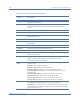
For non-802.11 devices, the information differs:
• Device Name - The device category the selected device belongs to (i.e., Bluetooth
Device, Digital Cordless Phone, etc.)
• Affected Channels - The range of channels being affected by the device.
• Average Power - The average energy reading of the device recorded since it was
detected.
• Center Frequency - The middle point of the frequency range detected for the device.
• Peak Power - The maximum energy reading of the device since it was detected.