
User guide




AirMagnet Spectrum XT User Guide
Chapter 7: Analyzing WiFi Data 95
Modulated interference refer to interference that occurs within a device's modulated spectrum (i.e.,
within the device’s operating channel width), whereas unmodulated interference refers to
interference caused by the “bleed over” of signals beyond the modulated portion of the
transmission.
Like the WiFi Devices graph, the Channel Occupancy graph requires more screen space to
display its content. Therefore, you may need to custom AirMagnet Spectrum XT’s user
interface in a way to make it easy for you to view the data. You can custom your screen space
by doing either or both of the following, depending on your screen resolution:
• Hide the entire Spectrum-WiFi Summary section by clicking (AutoHide).
•Click Settings and then uncheck all graphs except for the one that corresponds to
the Channel Occupancy graph.
Channels by Speed
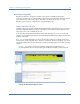
The Channels by Speed graph displays the relative amount of data (in kilobytes) that has been
transmitted at each data rate on each available channel in the selected radio band. The X-axis
shows all available channels in the radio band and the data rate used on each channel,
whereas the Y-axis shows the amount of the data (in kilobytes) transmitted on each channel as
well as a visual breakdown by data rate of the volume of data being transmitted. See Figure 7-
6.
Figure 7-6: Channels by Speed graph
The applicable transmission rates used in the selected radio band are colored coded. Table 7-3
briefly describes the color scheme.