
User guide




AirMagnet Spectrum XT User Guide
Chapter 7: Analyzing WiFi Data 93
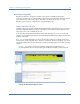
If you place the cursor over a portion of a channel bar marked by any of the colors, a tip screen
will appear showing the information about the AP. See Figure 7-4.
Figure 7-4: Viewing AP signal strength from tip screen
As shown in Figure 7-4, the tip screen provides the following basic information about the AP
covering the part of bar chart where the cursor points,
• MAC Address - The MAC address of the AP.
• AP - It can be an AP's name, the combination of an AP's vendor name and part of its
MAC address, or an AP's MAC address (depending on the option you have selected
using Settings>General>WiFi Devices).
• Signal Strength - The signal strength of the AP being recorded.
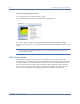
When a specific channel in the Channel Summary pane (in the upper-left corner of the screen) is
selected, all channel bars in the graph will become tinted except the one corresponding to the
channel being selected. This will help the user focus on the channel being selected. You can find
more information about APs on any of these channels by selecting
WiFi Graphs>WiFi
Devices
from the drop-down list menu in the upper left corner of the graph.
Table 7-2:
Color Data Description
Aqua 1st Max The highest AP signal strength detected.
Blue 2nd Max The second highest AP signal strength.
Green 3rd Max The third highest AP signal strength.