
User guide




90 Chapter 7: Analyzing WiFi Data
AirMagnet Spectrum XT User Guide
To access the WiFi Graphs list menu:
1) From graph window, click the title of a graph.
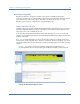
2) From the drop-down menu, select WiFi Graphs. See Figure 7-1.
Figure 7-1: WiFi Graph options
As shown in Figure 7-1, the WiFi Graphs list menu contains all WiFi graphs AirMagnet
Spectrum XT can generates. You can display any of them simply by clicking the option of your
choice.
If no AirMagnet-supported WiFi adapter is present in the machine, only the first three graph
selections will be available.
WiFi Devices Graph
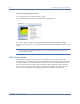
The WiFi Devices graph (or table to be more exact) option shows all WiFi devices that
AirMagnet Spectrum XT has detected on all available channels in the selected radio band. The
devices are displayed by channel. Like the Channel Usage section, channels with no devices
detected on them will not be listed in the WiFi Devices table. Within the same channel, the
devices are then organized in three groups: AP, Station, and Phone. If no device has been
detected for a certain group, then the group will not be listed either. See Figure 7-2.