
User Manual

LCD12864-COG
4.2 Basic Setting
To drive the LCD module correctly and provide normally display, please use the following seting
1> ADC = 0 (normal)
2> SHL select = 1(reverse)
3> LCD Bias Select = 1/9
4> Initial Display Line = 0
5> Entire Display ON/OF = OFF(normal)
6> Reverse Display ON/OF = OFF(normal)
7> Set Power Control Set:
Voltage follower = ON,voltage converter = ON,Voltage regulator = ON
8> Display ON/OF =ON
4.3 Resetting the LCD module
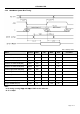
The LCD module should be initialized bu using /RES terminal.
While turning on the VDD and VSS power supply, maintain /RES terminal at LOW level, After the
Power supply stabilized, release the reset terminal(/RES = High)
4.4 Display Memory Map
Page 9 of 14