
User`s manual

24
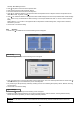
set Beep, Blink Message function.
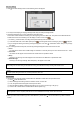
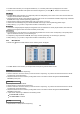
y Click ( ) Inspection Time frame to set inspection time.
y Click Check by frame to select inspection interval.
y Last Check Time: show the time of the last inspection.
y Click ( ) ▲, ▼ direction buttons on the right-hand side of Temperature frame to adjust to maximum temperature for the
HDD used in DVR. In general, it is 55℃.
y Click ( ) ▲, ▼ direction buttons on the right-hand side of HDD Damage frame to set the permissible level of HDD damage
(%). HDD is a very crucial element for DVR recording, so set the permissible level within 1% to 2% to assure maximum
safety.
While pressing (+) or (-) button on the rightmost side of Temperature or HDD Damage item, a target value increases or
decreases by 10 units.
y Choose ‘OK’ to confirm the setting.
4.2.3 Account
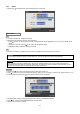
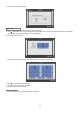
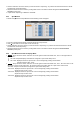
y Please click ( ) SYSTEM>Account and the following screen will appear.
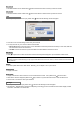
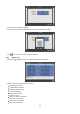
y Please click ( ) New Group and the following screen will appear.
y Click ( ) keyboard icon on the right-hand side of Group Name frame. Then, the virtual keyboard will show. Please click ( )
desired characters (up to 8 characteristics) on the virtual keyboard.
y Do provisioning for Group Name by selectively checking 5 some of the following items (Setup, Search, Network, Archiving
and Shut Down).
y Choose ‘OK’ to confirm the setting.
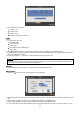
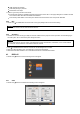
y Please click ( ) Login Settings and the following screen will appear.
y Selectively enable password protection for important operations (Setup, Search, Network, Archiving and Shut Down).
Please check 5 the operations you wish to enable password protection.
CAUTION
YOU WILL NOT BE ASKED TO ENTER YOUR PASSWORD FOR OPERATION(S) WHERE PASSWORD PROTECTION IS NOT
ENABLED.
Login Settings
New Group