
User manual


P a g e | 8 Copyright UltraDisk® Digital Voice Recorders
© All rights reserved 2011
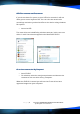
The DVR10 contains two drives with different files on each drive.
Drive J contains UltraDisk® Software
Drive J contains UltraDisk® Software Drive J contains UltraDisk® Software
Drive J contains UltraDisk® Software
Drive K contains your audio recordings
Drive K contains your audio recordingsDrive K contains your audio recordings
Drive K contains your audio recordings
Drive 1 '
Drive 1 'Drive 1 '
Drive 1 'J
JJ
J'
''
' (this letter
may vary on your
computer) - 'voicelist'
contains 2
applications
VOICEMEMOPLAYER
.EXE which launches
your audio
recordings and the
time synchronisation
application (SETTIME.EXE) which allows you to date and time stamp
your recordings.
This drive is not writeable and you cannot change any of its contents,
but you can execute the programs.
Drive 2 '
Drive 2 'Drive 2 '
Drive 2 'K
KK
K'
''
'-
Folder
REC_DATA
contains your
voice
recordings in
WAV format and will also contain any other music or file types copied
to the device
Drive 2
Drive 2 Drive 2
Drive 2 (K)
(K)(K)
(K) is therefore the area where saved files and recordings will be
stored on the DVR10. The memory that is available depends on the
contents of this drive, if the device is full, recording will not be possible
and this drive should be maintained by deleting or copying to the files
to your own PC.
Storage Capacity
Storage Capacity Storage Capacity
Storage Capacity
The total size of memory of the UltraDisk® DVR10 voice recorder is
available in 1gb, 2gb, 4gb and 8gb sizes, the total free space will always
be this value less the total allocated memory allocated to the autorun
software on drive 1.