
User manual


P a g e | 7 Copyright UltraDisk® Digital Voice Recorders
© All rights reserved 2011
USB
USB USB
USB Drive contents and file structure
Drive contents and file structureDrive contents and file structure
Drive contents and file structure
If you do not have free space on your USB voice recorder it will not
allow you to record anymore files. You can view the saved voice
recordings and other synchronised files on the device using windows
file explorer.
•
Insert the USB
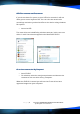
Two new drives are identified by windows autorun, in this case new
drives J: and K: have been mapped to the UltraDisk® DVR10
Or to v
Or to vOr to v
Or to view
iew iew
iew c
cc
contents
ontents ontents
ontents via ‘M
via ‘Mvia ‘M
via ‘My Computer
y Computery Computer
y Computer’
’’
’
•
Insert DVR10
•
On windows select the start/prompt button and browse the
contents of the new drive via my computer.
When the DVR10 is inserted you will see that 2 new drives have
appeared mapped to your computer.