
User manual


P a g e | 6 Copyright UltraDisk® Digital Voice Recorders
© All rights reserved 2011
Operat
OperatOperat
Operation
ionion
ion
Switch the R
Switch the RSwitch the R
Switch the Recorder
ecorderecorder
ecorder
On
OnOn
On
From Power Off
•
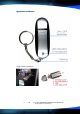
Push the power switch(ON/OFF) at the side of the recorder to
the “ON” position towards the microphone / LED indicator.
The LED indicator will Flash Blue, then
The LED indicator will Flash Red to indicate recording.
Turn the
Turn the Turn the
Turn the R
RR
Recorder
ecorderecorder
ecorder
Off
OffOff
Off
•
Push the power switch(ON/OFF) at the side of the recorder to
the “OFF” position towards the USB Connection / USB lid.
The LED indicator will stop, indicating that recording has stopped.
Automatic
Automatic Automatic
Automatic Save
SaveSave
Save
If the battery runs low during recording mode, the recordings will be
saved automatically.
Play
PlayPlay
Playing
inging
ing
R
RR
Recording
ecordingecording
ecordings
ss
s
The recordings are stored in WAV format and can be played back on any
windows pc without issue, defaulting to play in windows media, or any
other media player you may have installed that supports the file type. When
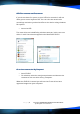
you insert the usb device into the pc, you will be prompted by windows for
an action.