
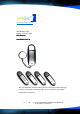
User manual


P a g e | 1 Copyright UltraDisk® Digital Voice Recorders
© All rights reserved 2011
Table of Contents
Table of ContentsTable of Contents
Table of Contents
Function overview ........................................................................... 2
Technical specifications ..................................................................... 3
Precautions .................................................................................... 4
Appearance and Buttons ................................................................... 5
Operation ..................................................................................... 6
Switch the Recorder On ..................................................................... 6
Turn the Recorder Off ....................................................................... 6
Automatic Save ............................................................................... 6
Playing Recordings ........................................................................... 6
USB Drive contents and file structure ..................................................... 7
Or to view contents via ‘My Computer’ ................................................... 7
Storage Capacity ............................................................................. 8
Setting the time and date stamp of recordings. ......................................... 9
Resetting the DVR10 ........................................................................ 9
Formatting the DVR10 ...................................................................... 9
Additional Voice & Audio Editing Software ............................................ 10
UltraDisk Support .......................................................................... 10
Logo Printing ............................................................................... 10