
User manual

Telephone Voice Recording System
Page|9
CopyrightUltraDisk™2010Allrightsreserved
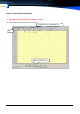
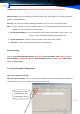
The Main menu Includes: Menu, Shortcut function button, Channels Status & Run info
Channels Status: real time showing each Channels work status, (Recording, Free, Incoming caller, Dial
Number, speaking Durations….)
Run Log: This stores the history of important information so that it can be easily traced anytime.
Note: The log is stored as run. log in C:\MDR and the files are automatically deleted when they exceed
200 KB. They are also stored in the backup files.
1. Incoming Call Numbers: Can save the details of the incoming call numbers. Setup:” Tools-> Ad-
vanced -> Save the detailed incoming call in CALLID*.TXT”.
2. System Information: Shows the channels for the current card and the card type.
3. Status Bar: Shows the available recording space and log history.
SystemSetting
Consists of Special Number Management, Auto Backup, Recording Work Time, Advanced Setup,
Channel Setting, Hard Disk Management, Extension Management, Password Setup, PBX Setting,
Alarm and Seats Setup.
3.2.1SpecialNumberManagement
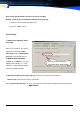
Here have 2 come true functions:
Not record special Number : You can set some special phone numbers that should not be recorded, for
example, when you access the internet or a fax call or a private call.
If check here, is only
record following spe-
cial-Number in the list