
User manual
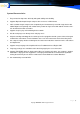

‐6‐
Installation
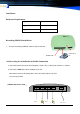
HardwareRequirement
Suggested PC CPU P4 / 2.8 GHz or above
Suggested Memory 512 MB or above
Suggested Hard Disk 80 GB or more *
RecordingUSBBOXInstallation
1. Insert the Recording USB BOX cable line into the PCI slot.
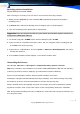
USBRecordingBoxInstallationandCableConnection
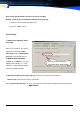
a. Connect the phone wire to the Recording Box’s LINE1, TEL1 is down-lead to Phone as showed.
b. Connect the USB cable into the USB port in the PC.
USB Box Connector mode:
If the Power led on the Recording box Is ON & the RUN led blinks, you have
Successfully installed
LINE2
US
TEL2 LINE1
TEL1
USB Cable
LineLine
PHONE LINE
USB Cable to
PC