
User manual


Telephone Voice Recording System
Page|29
CopyrightUltraDisk™2010Allrightsreserved
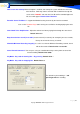
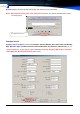
Stop recording When silence exceeds (sec.):
is only for Audio mode record function, the default value is 12 sec., if setting short low this time, the Voice
will divide into more files.
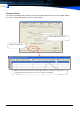
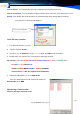
Multimeter: only for ZS-4200 series:
If have a channels can’t record, can use this tools checking the line Voltage
1. choose the Channel ID,
2. press the Check button, tools will shows the Voltage
3. setting more than check Voltage value to Off Hook Voltage,
4. Save it & restart the TVRS software, system will checking this Voltage for this channel
TVRSClientplayer(ThereareThreewaystohearontheweb)
SearchandplayvoiceinaNetwork(LAN)
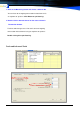
To Find & Play on the LAN, do as follows:
1. Install the Telephone Voice Recording System on the Client’s computer.
2. Share C:\MDR folder with full rights to all clients. Setting a Password by Admin’s User.
3. Share C:\VOC folder with full rights to all clients. Setting a Password by Admin’s User
4. Via Network Neighborhood to find under TVRS Server PC Shared MDR folder, running
the Client.exe program, can Find & play, Monitor listening by Client
5. Create a shortcut on the Client’s desktop, Can Run the shortcut of Client.exe in the future.
The check Voltage is 23, Setting more